

国际化的项目就会用用到一些第三方的登录api,这次记录一下Line 的!
按步骤来:
注册Line账号就不说了,虽然麻烦,这就自己去想办法了!
demo 请狠狠的戳这里 http://download.lllomh.com/cliect/#/product/J417081951162505
一:开发者平台配置
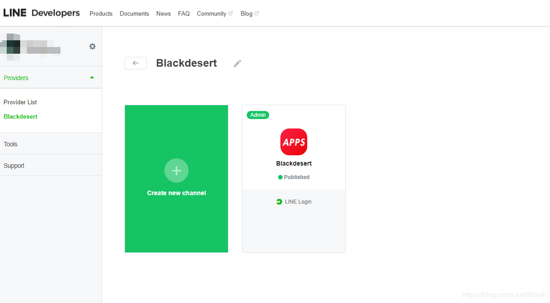
去Line 的开发者平台 新建一个App:
https://developers.line.biz/en/
 "text-align: center">
 "text-align: center">
 "text-align: center">
 "htmlcode">
'client_id'  => '5431649755',
'client_secret'=> '234b6e64c13285e6d058ff7b1bbc8e'
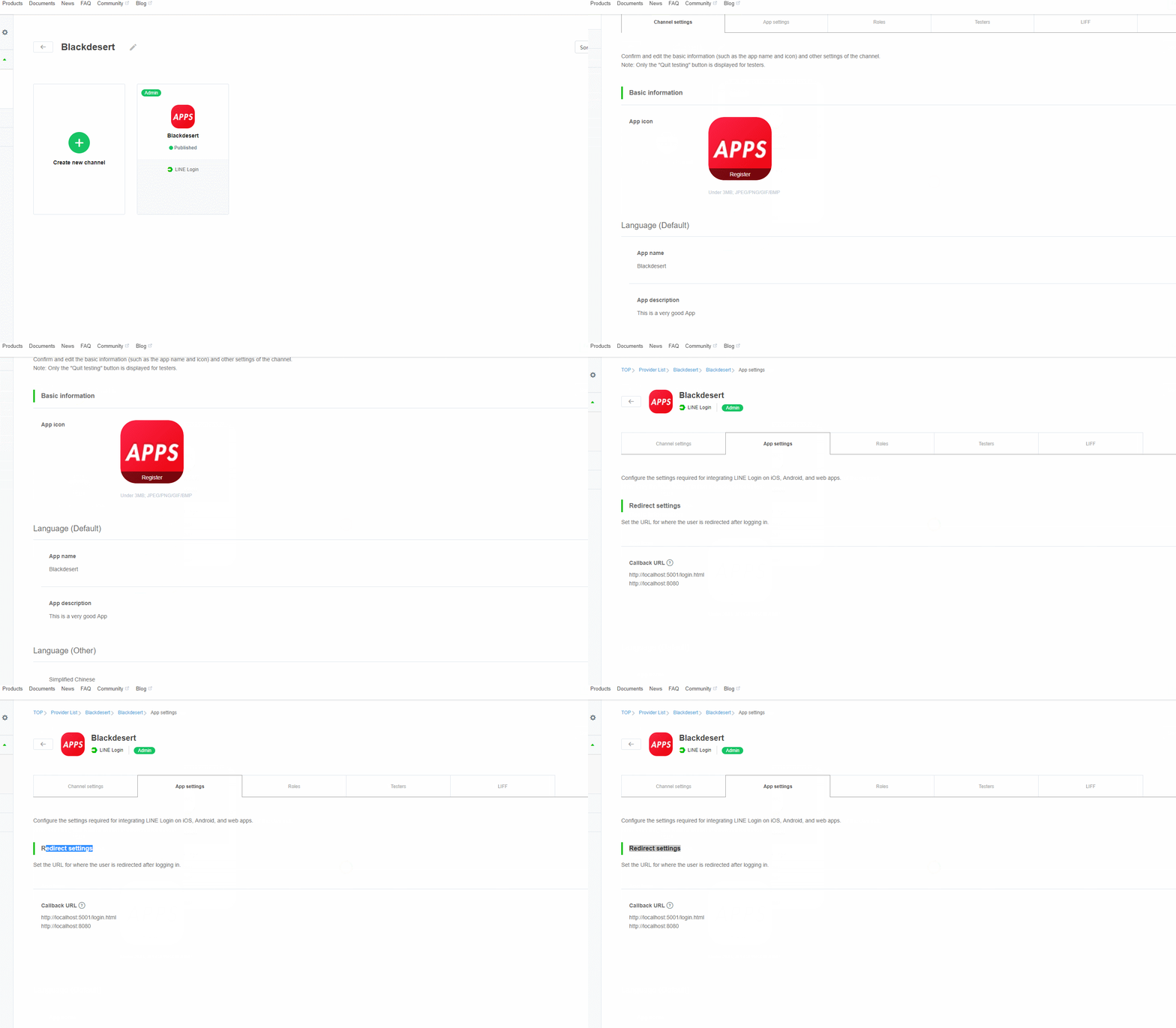
关键是这里的重定向地址要填(几乎所有第三方都要):
 "color: #ff0000">二:代码部署
核心获取第三方的部分
壹:组件封装:
1,起始:这里就
const { code } = queryString.parse(window.location.search.replace('"htmlcode">
async created() {
const { code } = queryString.parse(window.location.search.replace('"htmlcode">
async getToken(code) {
const result = new OAuthRequest({
code: code,
clientId: this.clientId,
clientSecret: this.clientSecret,
redirectUri: this.callbackUri
})
const params = new URLSearchParams()
linq.from(result.getPostable()).select(x => params.append(x.key, x.value)).toArray()
const { data } = await axios.post('https://api.line.me/oauth2/v2.1/token', params)
console.log(data,"data")// 这里拿到返回的第三方的结果个人信息
return new OAuthResult(data)
},
贰:组件封装:
1,组件使用:
除了 那个 三个参数,其他的一些 就看着修改整合吧
<template>
<div id="app">
<line-login-button
:client-id="clientId"
:client-secret="clientSecret"
:callback-uri="callbackUri"
@result="result"
add-friend
friend-required></line-login-button>
1232131
</div>
</template>
<script>
import LineLoginButton from './components/LineLoginButton'
export default {
data() {
return {
clientId: '2323649755',
clientSecret: '323128b6e64c13285e6d058ff7b1bbc8e',
callbackUri: 'http://localhost:8080' //这里要跟开发者平台中填写的一致
}
},
// created() {
// this.clientId = process.env.VUE_APP_LINE_CLIENT_ID
// this.clientSecret = process.env.VUE_APP_LINE_CLIENT_SECRET
// this.callbackUri = process.env.VUE_APP_LINE_CALLBACK_URL
// },
components: {
LineLoginButton
},
methods: {
result(res) {
console.log(res)
}
}
}
</script>
<style>
#app {
font-family: 'Avenir', Helvetica, Arial, sans-serif;
-webkit-font-smoothing: antialiased;
-moz-osx-font-smoothing: grayscale;
text-align: center;
color: #2c3e50;
}
#nav {
padding: 30px;
}
#nav a {
font-weight: bold;
color: #2c3e50;
}
#nav a.router-link-exact-active {
color: #42b983;
}
</style>
记得安装 这个插件所需的插件:
import queryString from 'querystring'
import axios from 'axios'
import OAuthRequest from '../Entities/OAuthRequest'
import linq from 'linq'
import OAuthResult from '../Entities/OAuthResult'
结果:
 "text-align: center">
 "color: #ff0000">总结

标签:
Line第三方登录api
免责声明:本站文章均来自网站采集或用户投稿,网站不提供任何软件下载或自行开发的软件!
如有用户或公司发现本站内容信息存在侵权行为,请邮件告知! 858582#qq.com
白云城资源网 Copyright www.dyhadc.com
暂无“Vue.js中Line第三方登录api的实现代码”评论...
更新日志
2026年03月20日
2026年03月20日
- 小骆驼-《草原狼2(蓝光CD)》[原抓WAV+CUE]
- 群星《欢迎来到我身边 电影原声专辑》[320K/MP3][105.02MB]
- 群星《欢迎来到我身边 电影原声专辑》[FLAC/分轨][480.9MB]
- 雷婷《梦里蓝天HQⅡ》 2023头版限量编号低速原抓[WAV+CUE][463M]
- 群星《2024好听新歌42》AI调整音效【WAV分轨】
- 王思雨-《思念陪着鸿雁飞》WAV
- 王思雨《喜马拉雅HQ》头版限量编号[WAV+CUE]
- 李健《无时无刻》[WAV+CUE][590M]
- 陈奕迅《酝酿》[WAV分轨][502M]
- 卓依婷《化蝶》2CD[WAV+CUE][1.1G]
- 群星《吉他王(黑胶CD)》[WAV+CUE]
- 齐秦《穿乐(穿越)》[WAV+CUE]
- 发烧珍品《数位CD音响测试-动向效果(九)》【WAV+CUE】
- 邝美云《邝美云精装歌集》[DSF][1.6G]
- 吕方《爱一回伤一回》[WAV+CUE][454M]